QuickBooks Desktop Bank Feed Issues – Pro Plus 2024
Having trouble with QuickBooks Desktop bank feeds or multiple active bank accounts? Learn how we resolved a real customer issue by matching unmatched transactions and reconnecting Bank of America in QuickBooks Pro Plus 2024.
Real Customer Case: QuickBooks Desktop Bank Feed Issues
A QuickBooks Desktop Pro Plus 2024 user had multiple bank accounts showing active bank feeds in the Chart of Accounts, but wanted to keep only Bank of America connected. During troubleshooting, we found that some accounts had downloaded transactions that were still unmatched. Those transactions needed to be matched before the bank feeds could be deactivated and the preferred account reactivated.
Why QuickBooks Desktop Wouldn't Let Us Deactivate the Bank Accounts
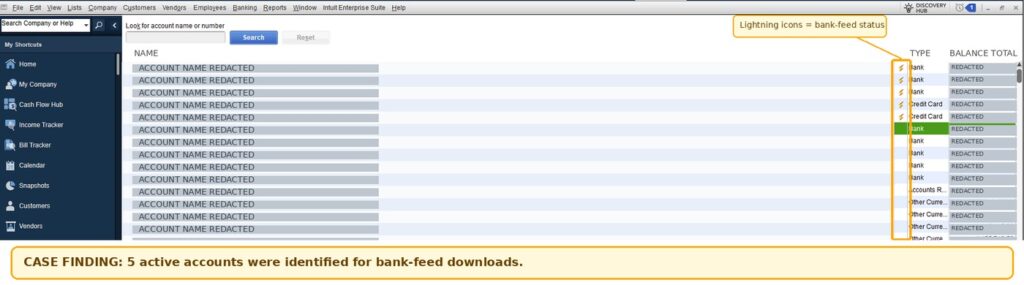
When we reviewed the Chart of Accounts, five accounts showed active bank feeds, indicated by the lightning-bolt icons. The customer wanted to retain Bank of America as the only active bank feed. However, QuickBooks would not let us deactivate some accounts because they contained downloaded transactions that had not yet been matched. We first needed to resolve those transactions before changing the bank-feed connections.
Review Active Bank Feeds in the Chart of Accounts
We opened the Chart of Accounts in QuickBooks Desktop Pro Plus 2024 and reviewed the bank accounts showing active online banking connections. The lightning-bolt icons helped us identify five accounts with active bank feeds. The customer confirmed that Bank of America was the account he wanted to keep connected. Before changing the connections, we checked the other accounts for downloaded transactions that still needed to be matched.
How We Restored the Preferred Bank of America Feed
After reviewing the Chart of Accounts, we found five accounts with active bank feeds. The customer wanted to keep Bank of America as the only active feed. Before we could deactivate the other accounts, QuickBooks Desktop required us to address downloaded transactions that had not yet been matched.
We guided the customer through matching the outstanding transactions. Once those transactions were resolved, we deactivated the unnecessary bank feeds and successfully reactivated the preferred Bank of America feed in QuickBooks Pro Plus 2024.
Case Resolution: Bank of America Feed Reactivated Successfully
After the outstanding downloaded transactions were matched, we were able to deactivate the unnecessary bank feeds and reactivate the customer's preferred Bank of America feed in QuickBooks Desktop Pro Plus 2024.
This case highlights an important troubleshooting step: before changing bank-feed connections, review any downloaded transactions that may still need to be matched. Resolving those items first can help prevent account deactivation from being blocked.
The preferred Bank of America feed was reactivated after the outstanding downloaded transactions were matched.
Need help with other QuickBooks Desktop issues? Explore our QuickBooks Desktop Support page for independent troubleshooting and support.
You can also visit Intuit's official QuickBooks Help and Support for additional product guidance.
Need Help with QuickBooks Desktop Bank Feeds?
Need help with QuickBooks Desktop bank feeds, unmatched transactions, or multiple active bank accounts? QBBooksPro provides independent QuickBooks support for small businesses.
Phone: 1-844-521-7321 | Email: [email protected]